THE PINNACLE PARTS COUNTERMIDTOWN MANHATTAN
Pinnacle Audiology Call Midtown

HEARING AID ACCESSORIES

Make more of
what you hear.

The right charger, a clearer television, or one voice brought closer. Find accessories for the hearing aids you already wear.

01 / THE PARTS COUNTER

The little things
make a difference.

Replacing something you already wear? Look for the name and size on your last pack. A familiar shape is a clue, not a fit check.

02 / THE COLLECTIONS

Browse by what you need

Start with the listening moment you want to improve, or go straight to your exact hearing aid model.

03 / COMPATIBILITY FIRST

Find your fit

Similar-looking accessories aren’t always interchangeable. Start with the model name from your app or paperwork.

41 catalog references

Reference guide only. No online ordering on this page.

Phonak / Filters

CeruStop wax filters

Replace a blocked wax guard with the right filter to keep the sound outlet clear.

Check compatibility

Check your receiver or custom mold: CeruStop is used with specified 6.0, 5.0 and 3.0 systems. Not for the CeruShield Disk system.
Oticon / Microphones

ConnectClip

Have one person wear the clip to stream their voice directly to your hearing aids.

Check compatibility

Oticon Intent miniRITE. Check other Oticon models before replacing it.

Oticon / TV streamers

TV Adapter 3.0

Hear the TV at a comfortable level without changing what everyone else hears.

Check compatibility

Oticon Intent miniRITE. Do not use the name alone to infer compatibility with another generation.

Signia / TV streamers

TV Sound

Stream TV sound directly to compatible hearing aids.

Check compatibility

Compatible Signia Bluetooth hearing aids only. Confirm the exact model against the manufacturer compatibility information before replacing it.

Widex / TV streamers

TV Play 2

Listen to the television through your hearing aids.

Check compatibility

Widex Allure and compatible Widex Moment hearing aids. TV Play and TV Play 2 are different products.

Widex / Remotes

RC-DEX remote

Adjust volume or change listening programs without reaching for a phone.

Check compatibility

Widex Allure and compatible Moment models. Check your exact older model before replacing it.

ReSound / TV streamers

TV-Streamer+

Send TV dialogue to compatible hearing aids at the volume you prefer.

Check compatibility

Wireless ReSound Sensia, ENZO IA, Vivia, Nexia and Savi. Verify the specific style supports wireless streaming.

Starkey / Microphones

StarLink Edge Remote Mic

Place the microphone near the person speaking for direct audio to compatible hearing aids.

Check compatibility

Consult the Omega AI or Edge AI exact model manual. Older Starkey microphones and nonwireless styles should not be assumed compatible.

Unitron / Microphones

PartnerMic

Clip it onto one speaker so you can hear their voice more directly.

Check compatibility

Unitron Moxi S-R and Moxi S-RX according to official pairing videos. Confirm the Unitron SKU rather than substituting the Phonak-branded unit.

Unitron / TV streamers

TV Connector

Hear the TV through your hearing aids without requiring headphones.

Check compatibility

Unitron Moxi S-R and Moxi S-RX; check manufacturer instructions for other models.

Rexton / Chargers

Travel Charger RIC

A portable charger for trips or a second place to recharge.

Check compatibility

Rexton lists a Travel Charger for Reach R Plus. Confirm the charger variant and original label rather than assuming another Reach model, BiCore, Slim RIC or custom CIC uses the same part.

Rexton / Chargers

Charging Station R

A stable at-home charging stand for compatible Rexton hearing aids.

Check compatibility

Listed for Reach R Plus. Confirm the exact fit before substituting it for a similar-looking charger.

ReSound / Microphones

Multi-Mic+

Clip the microphone to a speaker or place it on a table to send sound to your compatible hearing aids.

Check compatibility

Wireless ReSound Sensia, ENZO IA, Vivia, Nexia and Savi as listed by ReSound. Confirm exact wireless style; not the earlier Multi Mic.

Starkey / TV streamers

StarLink Edge TV Streamer

Stream television audio to compatible aids at a personal listening level.

Check compatibility

Starkey Omega AI+, Omega AI and Edge AI wireless models. This is the Edge version, not the earlier TV Streamer.

ReSound / Domes

SureFit 3 domes

Replace the soft ear tip with the same type and size you already wear.

Check compatibility

Compatible Vivia receiver configurations only after confirming both dome type and size. Some SureFit 2C and 3 setups use the same dome part numbers. Match the exact part, type and size.

Starkey / Filters

Hear Clear wax guards

Replace the small filter that helps keep wax out of the hearing aid’s sound outlet.

Check compatibility

Demonstrated for applicable Evolv AI RIC receiver configurations. Verify your exact guard before replacing it.

Oticon / Filters

ProWax miniFit

Replace a clogged filter rather than trying to clear it with a sharp tool.

Check compatibility

Specified Oticon Intent miniFit Detect receiver configurations. Match the filter type to the receiver or mold, not just to the brand.

Unitron / Chargers

Unitron Charger ITE

Keep a matching charger for your rechargeable custom hearing aids.

Check compatibility

Rechargeable Insera S-R per the Unitron guide. Do not substitute a Moxi RIC charger or assume compatibility with a disposable-battery Insera.

Unitron / Chargers

ChargerGo RIC S

An exact-fit portable charging option for a rechargeable Moxi S-R.

Check compatibility

Unitron lists this charger for Moxi S-R. It is different from the version for Moxi S-RX and the charger for Insera S-R.

Unitron / Chargers

ChargerGo RIC S-RX

An exact-fit portable charger for a rechargeable Moxi S-RX.

Check compatibility

Moxi S-RX only. Distinct from the Moxi S-R and Insera S-R chargers.

Signia / Microphones

StreamLine Mic

Bring a talker's voice to compatible hearing aids through a clip-on microphone.

Check compatibility

Not for Pure Charge&Go BCT IX, even though that model supports Bluetooth. Check the exact model in official support before replacing it.

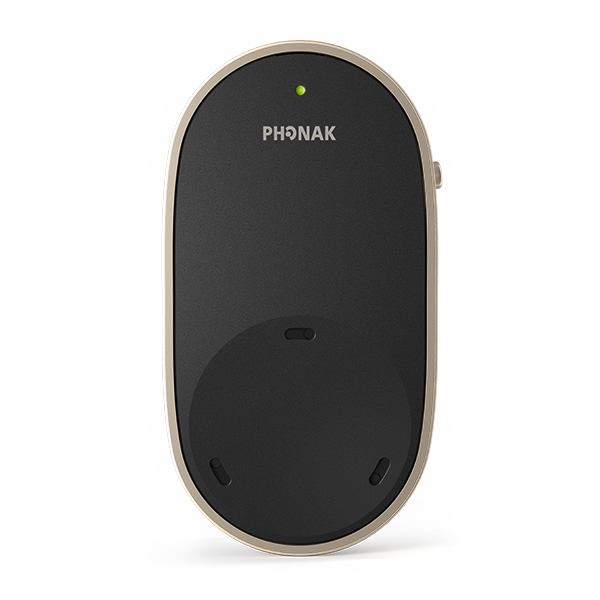
Phonak PartnerMic microphone, front view

Phonak / Microphones

PartnerMic

Clip it on to bring one speaker’s voice closer.

Check compatibility

Compatible Phonak Bluetooth models. Check the exact model in the manufacturer comparison chart.

Signia / Remotes

miniPocket

Change volume or programs without reaching for a phone.

Check compatibility

Selected Signia models. Confirm exact hearing aid compatibility and pairing instructions.

Starkey / Remotes

StarLink Remote Control 2.0

Adjust volume or listening programs from a handheld remote.

Check compatibility

Selected wireless Omega AI+, Omega AI, Edge AI, G Series AI and Evolv AI models. Confirm exact style.

Widex / Microphones

Sound Assist

Set it on a table or have one person wear it for closer conversation.

Check compatibility

Compatible Widex Moment hearing aids. Widex does not list Sound Assist for Allure.

Unitron / Remotes

Remote Control

Change volume or programs without using your phone.

Check compatibility

Unitron Moxi S-R and Moxi S-RX are documented. Confirm older models separately.

Rexton / Remotes

Smart Key

Use physical buttons for common hearing aid adjustments.

Check compatibility

Check your exact Rexton hearing aids against the manufacturer documentation before replacing it this remote.

Oticon / Domes

miniFit OpenBass · 10 mm

Match the 10 mm OpenBass pack by name, style and size.

Check compatibility

Only replace an existing OpenBass 10 mm with the same fitting and receiver. The prior pack or your clinician can confirm.

Oticon / Domes

miniFit Power · 8 mm

Match a worn Power dome to the pack you already use.

Check compatibility

An example of the Power 8 mm pack. Check the original style and diameter; do not substitute it for another dome design or size.

Phonak / Domes

EasyGuard Vented · Small

Match the vented Small shape and size to the pack you already use.

Check compatibility

Match the same supported Phonak receiver and original EasyGuard vented Small dome. Confirm before switching from a different shape or size.

Phonak / Domes

EasyGuard dome shapes

Learn the names of common EasyGuard shapes so you can read the label on your existing pack.

Check compatibility

Manufacturer family reference, not an individual pack. Do not change the dome style or size you were fitted with without checking with your audiologist.

Signia / Domes

Eartip 3.0 Open · 7 mm

Compare the openings and the 7 mm label to your existing part.

Check compatibility

EarWear 3.0 example. Match the exact receiver or tube, original dome style and size; do not assume older Click form factors fit.

Signia / Domes

Sleeve 3.0 Vented · XS

Recognize the longer sleeve profile in your existing fit.

Check compatibility

Match the exact EarWear 3.0 fitting and original XS vented sleeve. A sleeve is not interchangeable with an eartip simply because the size looks close.

Signia / Filters

WaxGuard 3.0 miniReceiver

Compare the dispenser shape before replacing a wax guard.

Check compatibility

Match the specific supported miniReceiver 3.0 or manufacturer-listed outlet; do not substitute legacy guards.

Widex / Domes

Easywear Instant Tulip · Large

Look for the Easywear Instant Tulip Large name on your previous pack.

Check compatibility

Check the exact receiver and previous fitting; do not infer fit with Allure V.2 or another generation.

ReSound / Domes

SureFit 3 · Open style

Match the open style and exact size to your existing pack.

Check compatibility

Some SureFit 2C and 3 fittings share specific dome part numbers. Confirm original type, size and part number with your clinician.

Starkey / Domes

Comfort Bud Open · 7 mm

Look for the Open 7 mm name and the same fitting.

Check compatibility

Match this exact dome and fitted receiver. Do not choose a size or interchange parts from a different Starkey family.

Rexton / Filters

Connexx NanoCare 3.0

Match the embossed 10993649 code on the dispenser.

Check compatibility

Only for manufacturer-listed receivers or outlets that specify NanoCare 3.0. Check the exact fitted receiver before replacing; don’t substitute for HP CeruStop XL.

Rexton / Domes

EarWear 3.0 tips and sleeves

Learn the EarWear 3.0 family names, then match the name and size on your existing pack.

Check compatibility

This is a family reference. Match the exact receiver and existing coupling. Do not interchange 3.0 and older 2.0 Click fittings.

Unitron / Domes

4.0 Open dome

An example of a dome family that needs a receiver check.

Check compatibility

Reference entry only. A specific U.S. package and compatibility are not confirmed here. Do not substitute for Smile or Insera fittings.

Unitron / Domes

Smile S-R · 6.0 Vented

Confirm the exact setup if your clinician identified your fitting as 6.0 vented.

Check compatibility

Reference entry only. Confirm the receiver family, original dome style and size with Pinnacle. Not an all-Smile compatibility claim.

GOOD TO KNOW

Before you replace a part

How can I find my hearing aid model?

Look on your previous paperwork or the device information screen in your hearing-aid app. If you have the last pack, match its brand, part name, size and code.

Can I substitute a different dome, filter or charger?

Even within one brand, different receivers and charging cases may use different parts. Use the same fitted part or ask an audiologist to confirm.

Can I order here?

Online ordering is not available on this page. For help identifying a compatible part or finding a cleaning or repair option, contact our Midtown office.

04 / THE PINNACLE DESK

Not sure what fits?

Tell us the brand and model you wear. If you have the old pack, keep the size and part number nearby.